Browse the marketplace
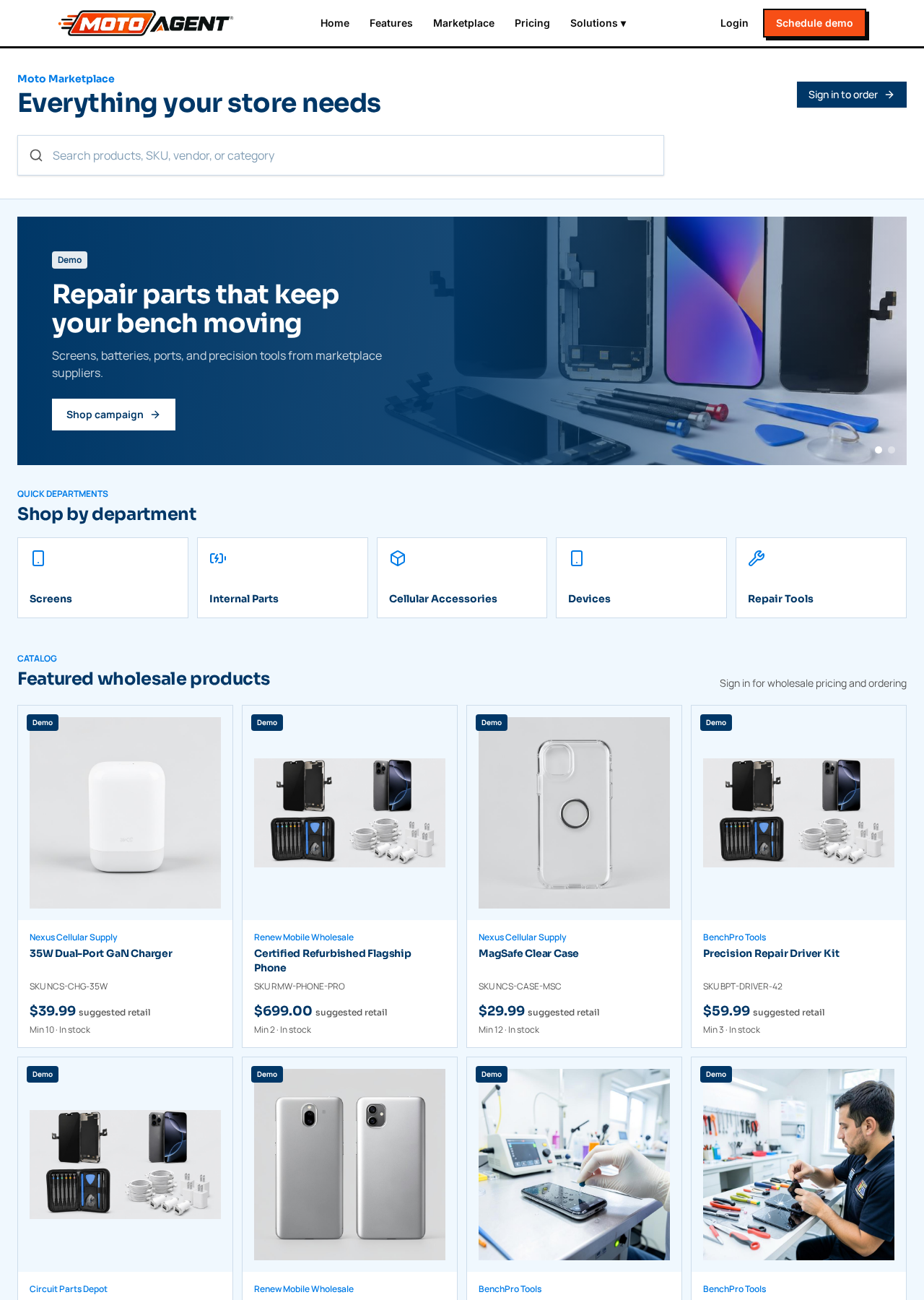
Open Marketplace to search products by name, SKU, vendor, or category. Use the department shortcuts for screens, internal parts, accessories, devices, and repair tools.
Marketplace highlights
The interactive gallery at the top brings together current campaigns and product picks. It changes automatically every few seconds. Use the arrow controls or page dots to move between gallery pages, or swipe across it on a phone or tablet. Moving your pointer over the gallery or focusing one of its links pauses the automatic change.
Demo storefronts
Listings marked Demo are fictional examples that show how a completed vendor storefront, product catalog, and campaign will appear. Real approved vendors are not relabeled.
Prices and ordering
Public storefronts show suggested retail pricing, availability, and minimum quantities. Sign in as a merchant to see wholesale prices and place orders.
Banners and promoted products
Approved campaigns appear in the rotating highlight gallery. Paid placements are marked Sponsored, and fictional examples are marked Demo.
The Wireless Dealer Marketplace home page also shows Sponsored banners from suppliers between its sections. Each banner promotes a product from that supplier catalog and opens their storefront when clicked.
The All Wireless and Prepaid Expo banner and the Moto Agent banner appear side by side just below the search area on the Wireless Dealer Marketplace home page. Each opens the matching site when clicked.
Searching from the marketplace home page now opens a dedicated search results page with its own results, popular department links, and matching storefronts, instead of changing the catalog on the home page.
Departments
The marketplace is organized into nine departments: Screens, Internal Parts, Cellular Accessories, Devices, Repair Tools, Audio and Speakers, Wearables, Tablets, and Services. Each department opens its own page listing every product in that group. The Services department is different: instead of product listings it opens the partner applications for AKKO device protection, Acima lease to own, and North merchant processing. Department tiles on both marketplaces show a photo for every department.
Financing and device protection services
The Services department on both marketplaces highlights AKKO device protection and Acima lease to own separately from physical products. Selecting an offer opens an application inside Moto Agent that collects your business and contact details, store count, monthly device volume, coverage or financing scope, current provider, and a signature. You can review your submitted application and its status at any time by opening the same offer again. Submissions arrive in Super Admin under Merchant processing for review.
Under Services you will also find UpPluck Social, a registered ISO for North merchant processing. Choosing it opens a pre application that collects basic business information and the last three monthly processing statements from your current provider. Submissions arrive in Super Admin under Merchant processing for review.
Compact partner offer banners for AKKO protection, Acima leasing, and North merchant processing also appear near the bottom of both marketplace home pages and on every vendor storefront page.
Dealer account application (opens directly)
On the Wireless Dealer Marketplace home page, select Apply for an account near the top of the page to open the business verification application. The same application is available from the header, the verified buyers section, and the footer. Sign in or create an account when prompted. The application requires business details, an EIN, owner or operator identification, a resale or sales tax certificate, and a signature. Open My account to check the review status.
The top of each marketplace home page now shows a product collage of phones, parts, accessories, and repair tools behind the search area, so visitors immediately see what the marketplace offers.
Wireless Dealer Pulse
Wireless Dealer Pulse is the industry blog on Wireless Dealer Marketplace. Open it from Pulse in the header or from the footer. It carries interviews with industry leaders, industry news, new products and services launching by providers, and coverage of events such as the All Wireless and Prepaid Expo and the GRE Gadget Repair Expo. Anyone can read it without an account. Stories are managed by Super Admin in the pulse posts table, and each story has its own shareable page.
Sponsored placements on Wireless Dealer Pulse
Wireless Dealer Pulse carries sponsored vendor placements alongside its stories. On the Pulse home page a full width sponsored banner sits under the featured story and two smaller sponsored banners sit near the bottom, and every story page shows a sponsored banner after the article. Each placement is labeled Sponsored and links to that vendor storefront. These slots will be monetized as vendor advertising.
Vendor directory
Both marketplaces have a Vendors & Distributors directory linked from the main menu. The directory lists every approved supplier in alphabetical order with a search box. Homepage storefront placement is reserved for featured partners (paid placements); everyone else appears in the directory. A link from the homepage Featured storefronts section opens the full directory.
Verified badges
Both marketplaces show the Verified Merchants and Verified Distributors trust badges in the far right column of the footer. The badges signal that buyers are real verified businesses and suppliers are trusted distributors. They appear on every page that uses the site footer, including the Moto Agent site, the Moto Marketplace, and the Wireless Dealer Marketplace.
Verified badges in the footer
Both marketplaces end with a prominent "Verified" column at the far right of the footer. It shows two shields side by side with transparent, floating backgrounds:
- Verified Merchants (green check) for the Moto Agent storefront footer
- Verified Distributors (orange check) alongside it on the Wireless Dealer Marketplace
The badges sit side by side, have no white box or shadow around them, and reinforce that buyers and suppliers on the platform are real, vetted businesses.
Placing an order
Every product tile on both marketplaces now opens its own product page with photos, wholesale pricing, minimum quantity, stock, and shipping and return terms. Choose a quantity and add the item to your cart. Your cart groups items by supplier, and you check out with one supplier at a time. Checkout confirms the shipping address, which is prefilled from your approved business account on the Wireless Dealer Marketplace or from a store location on the Moto Agent Marketplace, then takes payment. After paying you land on an order confirmation page, and Orders in the header tracks every order through awaiting payment, paid, packed, shipped, and delivered.
On the Wireless Dealer Marketplace, browsing and viewing prices is open to everyone, but adding to cart and ordering unlock only after an admin approves the business account.
Buyer dashboard for dealer accounts
A business that buys on the Wireless Dealer Marketplace but does not run Moto Agent now signs in to its own buyer dashboard instead of the store command center. The dashboard shows account approval status, items sitting in carts, orders in progress, total orders, lifetime spend, the five most recent orders, open carts by supplier, and quick links to browsing, the vendor directory, order history, business account details, and Wireless Dealer Pulse. Store owners and staff still land in the command center, and suppliers still land in their vendor area.
Dealer menu and sign in state
The Wireless Dealer Marketplace menu only shows Dashboard, Orders, My account, and Cart once you are signed in. Signed out visitors see Sign in and Apply for an account. Signed in buyers also see a Sign out option in the marketplace header, which clears the session and returns to the marketplace home page.
Connected industry promotions in the store back office
Moto Agent and All Wireless Expo promotions appear together throughout the store back office. A larger pair appears on the main dashboard, and a compact pair appears above the other work areas. Each promotion opens its matching website in a new tab.
Services navigation
Both marketplaces link to Services from the header menu. The footer also has a dedicated Services column with direct links to AKKO device protection, Acima lease to own, and North merchant processing. The Wireless Dealer Marketplace footer no longer shows Application status; signed in buyers can review their account from My account in the header.
North Payments campaign banners
North Payments sponsored banners appear near the bottom of public Moto Agent and Wireless Dealer Marketplace pages, plus the Moto Agent merchant dashboard, Wireless Dealer buyer dashboard, and vendor dashboard. The complete banner artwork stays visible without cropping. Selecting a banner opens the North merchant processing pre application for that part of the platform.